
Renting All-in-One PCs and Laptops for Business: Leasing vs DaaS
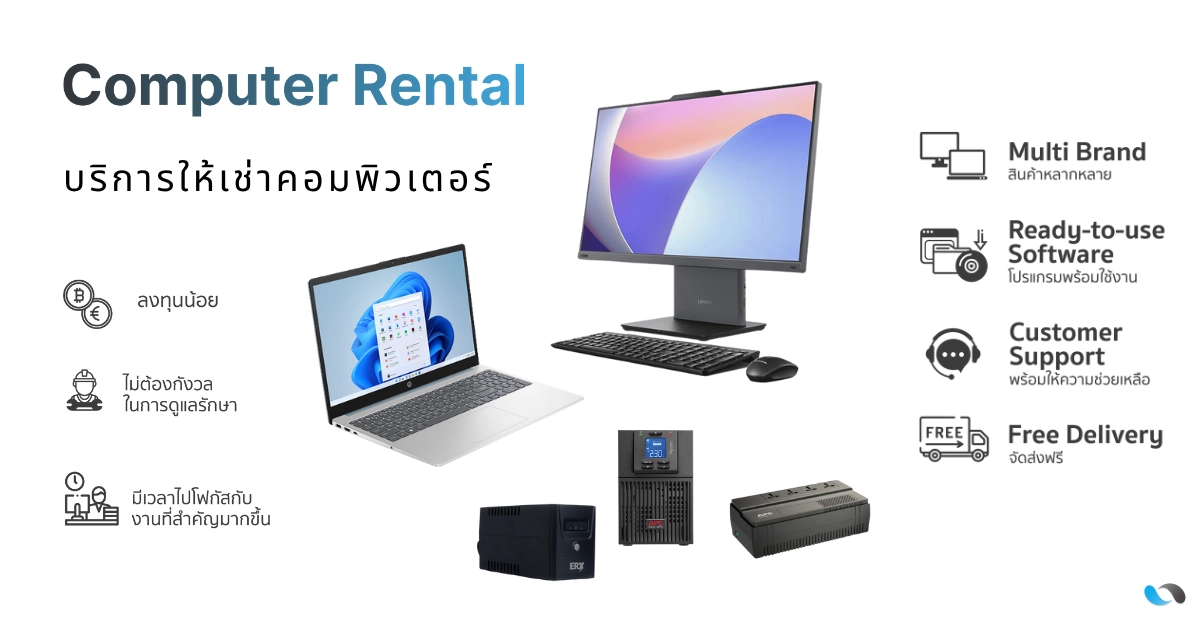
A comparison of two ways to rent business computers. Leasing usually covers the hardware only, so your team handles support. DaaS, or rental with service, bundles devices and support in one contract. Includes the main terms of CommTech’s All-in-One PC, laptop and UPS rental.
Computer rental for businesses: how Leasing and Device-as-a-Service (DaaS) differ, and which one fits you
Reliable computers are a basic tool for every organisation. But buying many devices at once ties up a large budget, and the work of maintaining, repairing and managing them continues for their whole life. That is why many organisations rent instead of buy: costs are spread into regular payments that are easier to plan.
The two most common models are Leasing, a financing contract for acquiring equipment, and Device-as-a-Service (DaaS), a rental that bundles devices and support in one contract. This article explains how they differ, what to know about the accounting, and what CommTech’s computer rental service includes, so you can choose the right fit.

Leasing: a financing contract focused on the equipment
Leasing lets an organisation use IT equipment in return for monthly payments under a contract, instead of paying the full price up front. The term, minimum value and other conditions depend on each provider. At CommTech, leasing contracts run for 3–5 years.
There are two common types of lease:
- Operating lease: you rent the equipment for the contract period. At the end, you can return it, renew the contract, or buy the equipment on the terms agreed.
- Finance lease: you take on almost all the risks and rewards of the equipment, and at the end you usually have the option to buy it at a price agreed in advance.
Both are different from hire purchase (เช่าซื้อ), where ownership passes to the hirer once all instalments are paid. Check which type of contract you are signing before you commit.
An accounting note: how a lease is recorded in your accounts (under TFRS 16 or TFRS for NPAEs) depends on your type of business and the contract terms. Check with your accountant or auditor before you decide.
Benefits of leasing:
- Lower upfront investment: get the equipment you need without one large cash payment.
- Easier budgeting: contracted monthly payments make cash flow easier to forecast.
- Options at the end of the term: return, renew or buy, depending on the contract type.
Things to consider: most leases cover the hardware only. Installation, setup, maintenance, repairs and user support stay with your organisation or require a separate service contract. Include these in your total cost calculation.
Device-as-a-Service (DaaS): devices and support in one contract
Device-as-a-Service (DaaS) treats IT equipment as a service rather than an asset. The provider supplies the devices together with related services, such as delivery, installation and repairs, for a regular fee. Details such as software, remote management or mid-contract upgrades vary by provider, so check exactly what the contract covers.
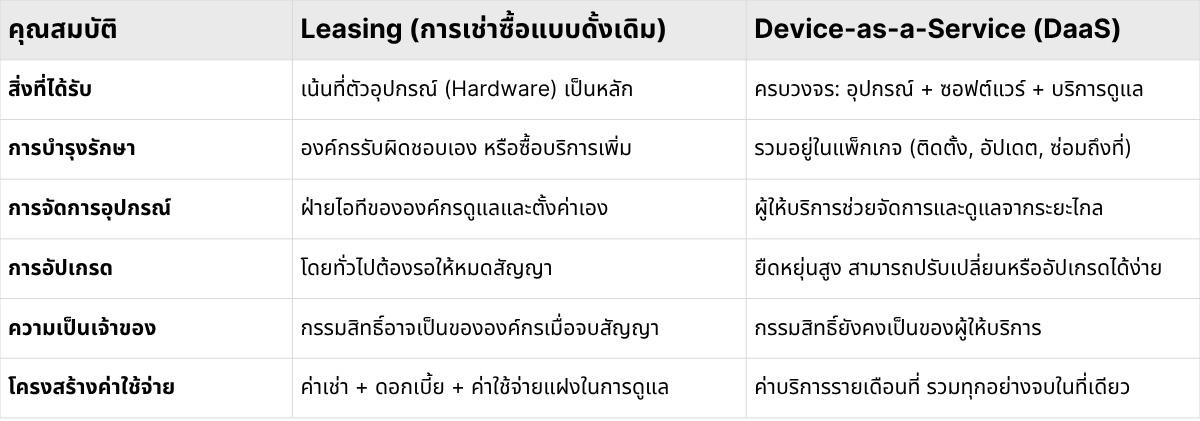
Comparison: Leasing vs DaaS / rental with service
CommTech’s computer rental service
CommTech rents computers to organisations as a rental-with-service model. The main terms are:
- Devices available: All-in-One PCs, laptops and UPS units.
- Pricing: the DaaS service is billed monthly per device.
- Minimum rental term: 3 years.
- Delivery and installation: no extra cost (you keep the boxes until the contract ends).
- Spare units: 1 spare unit for every 30 units rented.
- Claims: usually handled within 1–2 days after diagnosis.
- Accidental damage: damage caused by the renter is not covered, but optional accident insurance is available.
- Antivirus: can be added to the same contract.
- Data security at contract end: data is permanently erased with Data Erasure.
Summary: which model fits your organisation?
The answer depends on your IT team’s capacity, whether you want to own the equipment, and how you manage your budget.
Leasing suits:
- Organisations with an in-house IT team that can install and support devices themselves.
- Organisations that want a financing option and may want to own the equipment at the end (for example, a finance lease with a purchase option).
- Organisations that can absorb maintenance costs that fall outside the contract.
DaaS / rental with service suits:
- Organisations that want staff to have working devices without buying many units at once.
- Organisations that want to reduce installation and repair work for the IT team, so the team has more time for other priorities.
- Organisations that want predictable regular costs, because the core services are already in the contract.
- Organisations that want data wiped in a controlled way when devices are returned.
Whichever model you choose, compare the total cost over the contract term, the service scope, the end-of-contract terms and the accounting impact together.
Wondering whether renting computers makes sense for your organisation?
See the details and FAQs on CommTech’s computer rental page, or contact our team to discuss how many devices you need and how your teams will use them.
Explore Our Blog Posts
Stay updated with our latest blog posts.

Fiber Optic Cable Guide: Single-Mode vs Multi-Mode Fiber

7 Types of Network Topology Explained, with Pros and Cons

IPv4 vs IPv6: What's the Difference and Why It Matters
Join our newsletter for updates
Stay informed with our latest news and promotions
