

Coaxial Cable and LAN Cable Explained: Types and Uses (Part 1)
Coaxial Cable
Most people have seen signal cables before, even if they don't know their names. The one we probably know best is the cable connected to old TV antennas, called coaxial cable. Electricians often just call it "coax".
Coaxial cable comes in several types, labeled RG (short for Radio Guide), such as RG6, RG8, RG11, RG58 and RG59. Each type has different specifications.
Basic structure of a coaxial cable
(The structure of a coaxial cable varies by type, and so do its properties.)

1. Copper wire: the copper core at the center, which carries the signal.
2. Insulation: a layer of non-conductive insulating material, such as PVC plastic, that surrounds the core.
3. Copper mesh: the layer just outside the insulation, which shields the signal-carrying wire. It is a braided mesh of copper or aluminum. This layer protects against electromagnetic interference, known as noise, which can distort the signal.
4. Outside insulation: the outermost layer, or jacket, made from PVC or other materials with good electrical resistance.
Common types of coaxial cable
Each type has different specifications.
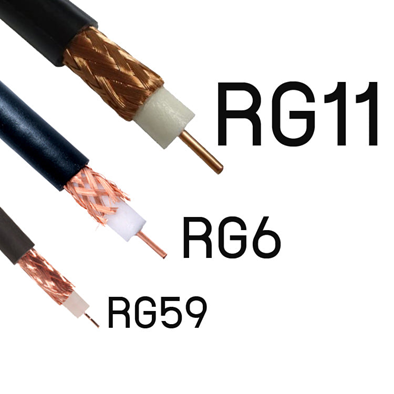
1.) RG6 cable RG6 comes in several grades and is mostly used in CCTV systems. Choose a high-quality RG6 cable with 95% shielding: a low-quality cable with only 60%-80% shielding may give poor picture quality.
RG6 cable comes with either a copper shield or an aluminum shield, depending on where it will be installed. For cable runs of about 500 meters or more, use a copper-shielded cable. If the CCTV camera is close by, within 300 meters, an aluminum-shielded cable is enough.
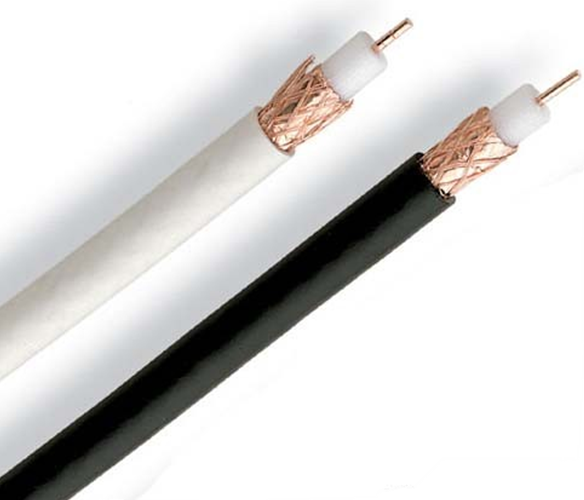
RG6 comes in black and in white. White cable is mostly used indoors because it does not stand up well to sunlight (most white cables are low grade): the white jacket deteriorates and breaks easily.
Black RG6 is a higher grade than white. It is more durable, handles sunlight and heat well, and does not deteriorate or break easily, but it costs more.
Black cable is naturally more popular than white because it lasts longer, which makes it better value: you do not waste time replacing equipment as often. In the end, though, it depends on what the user needs.
2.) RG59 cable Like RG6, RG59 carries video signals, but it is thinner and more flexible. It can carry video no further than 200 meters, because its small size gives it the highest signal loss. RG59 suits indoor use, in elevators, and even in car rear-view camera systems, because it is thin and flexible.
3.) RG11 cable A thick cable that can carry signals up to 1,000 meters. Because it is larger than RG6 and RG59, it has a larger core and carries signals further. It suits long cable runs. Since it is thick and fairly stiff, it is usually used only for main (backbone) runs, satellite dish systems or CCTV systems. It is not commonly used in homes or inside buildings where the cable has to bend a lot, because it is stiff and hard to twist.

For runs longer than 1,000 meters, you need an extra device called a booster, which amplifies the video signal so it can travel further. Some booster models carry video up to 1,500 meters, and some beyond 2,000 meters.
In short, each type of cable has different properties, and it is up to you to choose the one that suits your job or site. Choosing the right cable gives you better value for your time and investment, and better quality work.
LAN
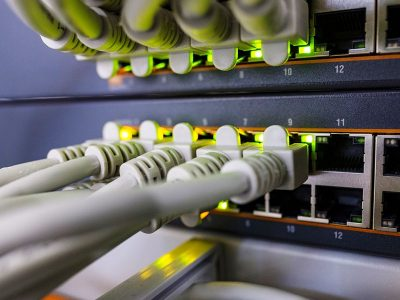
The next type of cable is one we see all the time: in computer rooms, in rooms that house internet network equipment such as network switches and hubs, or plugged into the router in your home. This cable is called a LAN cable.
A LAN cable, or twisted-pair cable, has pairs of copper wires twisted together to a standard pattern. The twisting reduces electromagnetic interference from neighboring pairs in the same cable and from outside sources.
The data rate over twisted-pair cable also depends on the thickness of the wire. Copper wire with a larger diameter can carry a stronger electrical signal, so it can send data at a higher rate.
In general, for digital transmission, where the signal is a square wave, twisted-pair cable can carry several megabits per second over distances of several kilometers. Because twisted-pair cable is inexpensive, carries data well, and is light and easy to install, it is widely used.
Types of LAN cable
There are 2 types

1.) Shielded Twisted Pair (STP) A twisted-pair cable wrapped in an extra, thick outer layer of insulation to protect against electromagnetic interference.
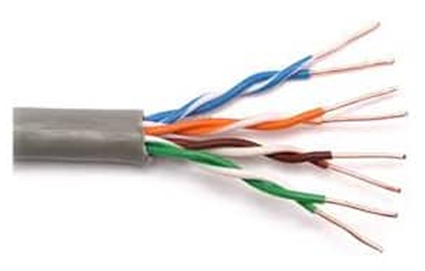
2.) Unshielded Twisted Pair (UTP) A twisted-pair cable with a thin outer layer of insulation. It bends easily, but protects against electromagnetic interference less well than STP.
LAN cables today include Cat5E, Cat6, Cat6A, Cat7 and Cat8, but the most common are Cat5E and Cat6. Here is how they compare:

Basic structure of a LAN cable
(The structure of a LAN cable varies by type, and so do its properties.)
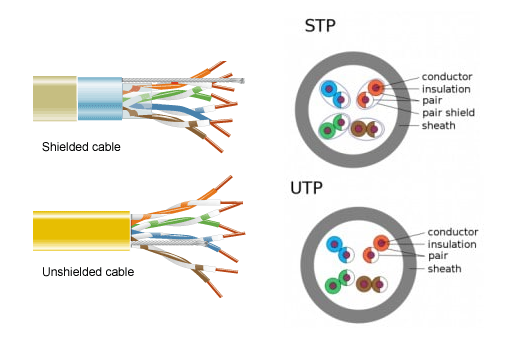
- Conductor: the copper signal wires, 8 in total (4 pairs)
- Insulation: the covering on each copper wire (color-coded to international standards)
- Pair: reduces electromagnetic interference from neighboring pairs in the same cable and from outside
- Pair shield: protects each pair so the electrical signals do not interfere with each other, and acts as an electrical ground
- Sheath: the outermost protective layer of the LAN cable
Installation types

1.) Indoor cable
Indoor cables usually have an outer jacket made of PVC, because it is flexible and resists the spread of fire. Fire safety codes and standards also require special additives, so there are 4 widely used types of indoor cable:
- CM (Communication Metallic): resists horizontal flame spread. Suitable for general use, such as horizontal cabling within the same floor (horizontal wiring).
- CMR (Communication Metallic Riser): resists flame spread both horizontally and vertically. Often used for cabling between floors through the building's cable shaft (vertical shaft).
- CMP (Communication Metallic Plenum): suitable for running above ceilings or in the air-circulation space above a suspended ceiling (plenum space), but it cannot prevent vertical flame spread.
- LSZH (Low Smoke Zero Halogen): resists flame spread both horizontally and vertically, like CMR, but in a fire it also gives off little smoke and no toxic substances.
2.) Outdoor cable
Outdoor cables have an outer jacket made of PE (polyethylene), which withstands outdoor conditions and does not corrode, but it does not resist the spread of fire. So choose the right cable for how it will be used.
Wiring LAN cables
There are 2 types
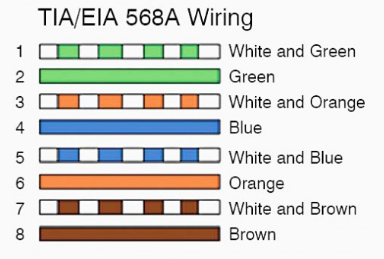
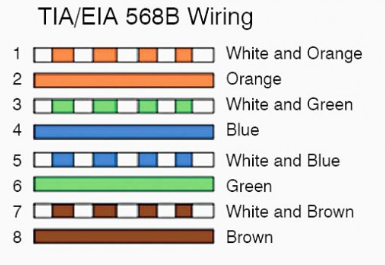
1.) Straight-through wiring (Straight Through Cable EIA/TIA 568A & 568B ) TIA 568B is the most common. This cable connects devices of different types, such as:

- Switch to router
- Switch to PC or server
- Hub to PC or server
Straight-through wiring (Straight Through Cable) comes in 2 versions, as shown below
2.) Crossover wiring (Crossover Cable EIA/TIA 568A & 568B ) This cable connects devices of the same type, such as:

- Switch to switch, or switch to hub
- Hub to hub
- Router to router
- PC to PC


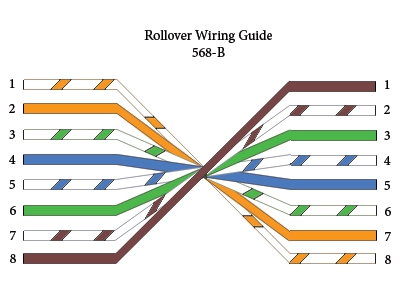
3.) Rollover wiring (Rollover Cable) This cable connects the following devices:
- Router to PC
- Managed switch to PC
A rollover cable is not meant for sending data. Instead, it creates an interface to the device, which supports programming network devices from a central location. Troubleshooting can be carried out across the whole system, and all hardware components on the network can be upgraded at once.
What each wire color does in the standard order (EIA/TIA 568A & 568B)

The TIA/EIA-568A and TIA/EIA-568B standards define the order of the wires in an RJ45 connector. In practice there is no difference between the two; the only difference is that the green and orange wires swap positions.
Why are there different wiring types?
MDI (Medium Dependent Interface): A type of Ethernet port used on a network interface card (NIC), often called a LAN card, which is installed in a computer. The Ethernet ports on a router are also MDI. (Devices with MDI ports: routers and computers.)
MDIX or MDI-X (the "X" stands for "Crossover"), or Medium Dependent Interface Crossover: A type of Ethernet port found on hubs and switches. (Devices with MDI-X ports: hubs and switches.)
So:
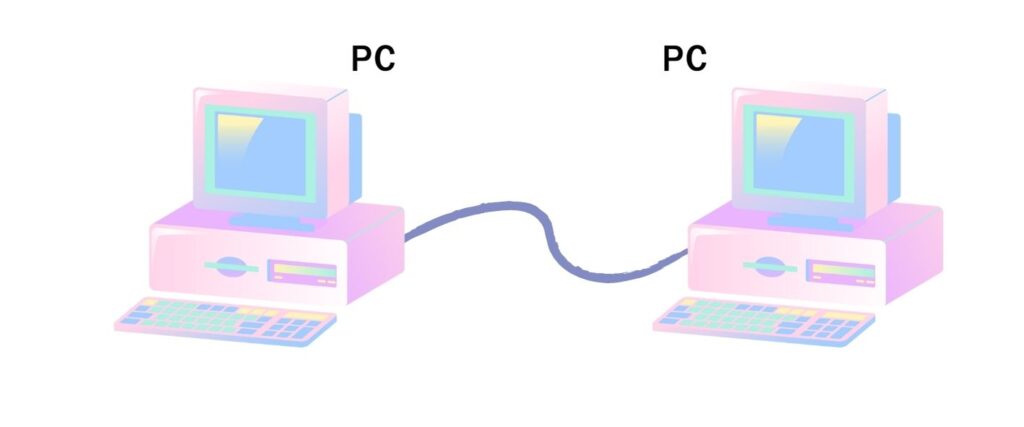
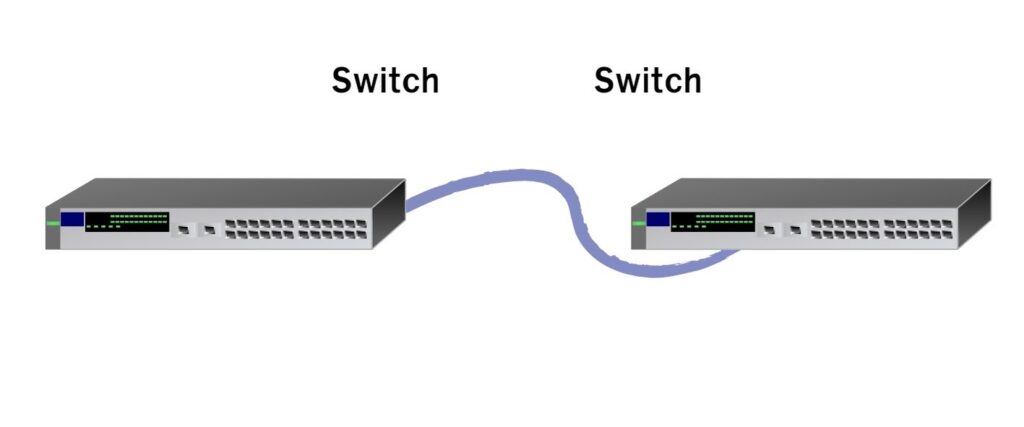

Devices of the same type connect with a crossover LAN cable, e.g. MDI to MDI, or MDI-X to MDI-X.
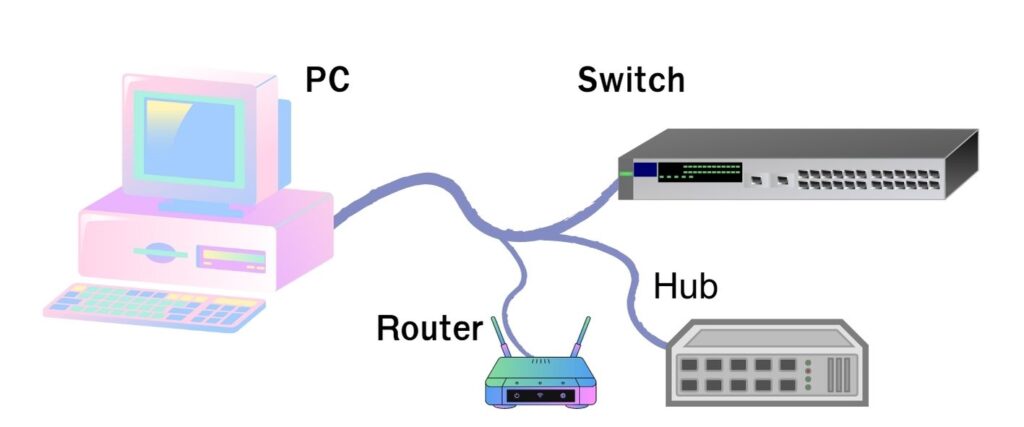
Devices of different types connect with a straight-through LAN cable, e.g. MDI to MDI-X.
Will it work if the cable is not wired to the standard?
Yes, it will. However, the magnetic fields may not cancel each other out completely, so the signals interfere with each other. This causes loss in the cable, and in the end the LAN card has to automatically drop its speed from 100 Mbps to 10 Mbps so that you can still use it.
Explore Our Blog Posts
Stay updated with our latest blog posts.

Computer Rental for Government Agencies: 4 Benefits and How to Procure It

Cencora Pays $75M Bitcoin Ransom After Ransomware Attack
Renting All-in-One PCs and Laptops for Business: Leasing vs DaaS
Join our newsletter for updates
Stay informed with our latest news and promotions
